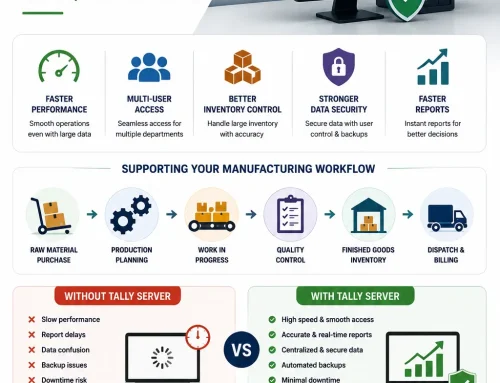
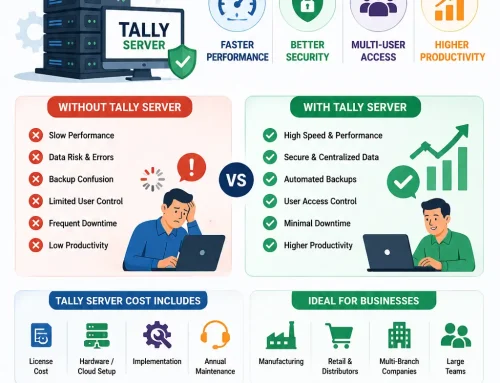
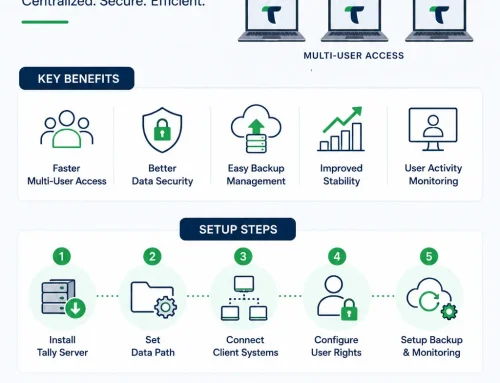
Tally Server overview
When Tally Server becomes the right upgrade
Tally Server becomes the right upgrade when a growing business has multiple users working on the same Tally company data and starts facing slow performance, delayed reports, backup interruptions, user waiting time, or data stability concerns. This guide explains the warning signs, readiness checks, cost and ROI factors, setup requirements, and next steps so owners, accountants, finance heads, and IT teams can decide whether basic Tally sharing is still enough or whether a Tally Server setup should be reviewed.
If your team uses Tally every day and the software has started feeling slow, the problem may not be TallyPrime itself. In many growing businesses, the real issue is the old way company data is being shared across users. This is exactly where Tally Server becomes important.
A small team can often manage with one computer, a shared data folder, and a few users opening the same company data over the local network. But once the business grows, that simple setup starts showing its limits. More invoices, more inventory entries, more reports, more reconciliations, and more people working at the same time can turn basic Tally sharing into a daily bottleneck.
This guide explains when a business should seriously consider Tally Server, what problems it solves, how to judge buying intent inside your own business, and how to decide whether your current multi-user Tally setup has outgrown basic file sharing.
Quick Answer: When Does a Business Need Tally Server?
Your business should consider Tally Server when multiple users work on the same Tally company data every day and the team is facing slow Tally performance, delayed reports, backup interruptions, data access confusion, or worries about company data stability. Basic Tally sharing is acceptable for light usage, but Tally Server becomes a serious requirement when Tally is no longer just an accounting tool and has become daily business infrastructure.
In simple terms, if your accounts, sales, inventory, purchase, and management teams depend on Tally at the same time, Tally Server is worth evaluating before small delays turn into lost productivity and data risk.
Seeing these signs in your Tally setup?
If multiple users wait for reports, backups interrupt work, or company data opens slowly, review whether Tally Server is the right next step.
Who This Tally Server Guide Is For
This article is written for owners, accountants, finance heads, IT managers, and operations teams who already use TallyPrime and are trying to understand whether a stronger setup is needed. It is especially relevant if your business has moved from a small accounting team to a larger multi-user environment.
- You use TallyPrime in multi-user mode.
- Multiple people open the same company data during business hours.
- Reports, voucher entry, inventory work, or backups slow down the team.
- You are adding branches, users, stock movement, or reporting requirements.
- You want a more stable Tally environment before scaling further.
If your main need is remote access from outside the office, also compare this decision with Tally on Cloud vs traditional Tally cost. If your main issue is local office performance with many users, Tally Server is usually the more direct topic to evaluate first.
What Is Tally Server?
Tally Server, also known as TallyPrime Server, is designed for businesses that need smoother multi-user access, better data stability, and stronger control over Tally company data. Instead of every user directly pulling and writing data through a normal shared folder, Tally Server manages access more intelligently so multiple people can work with fewer interruptions.
The goal is not to replace TallyPrime. The goal is to improve how your team uses TallyPrime when the business has grown beyond a simple single-system or basic network-sharing setup. You can also review the official TallyPrime Server product information for the core product context.
Tally Server Decision Snapshot
If you are deciding quickly, use this snapshot before reading the full explanation. It shows the most common business situations and what they usually mean.
| Business situation | What it usually means | Recommended action |
|---|---|---|
| 1 to 2 users, small company data, no regular slowness | Basic Tally sharing may still be enough | Maintain backups and monitor growth |
| 3 to 5 daily users with growing transaction volume | The setup is entering the evaluation stage | Review network, system, data size, and user workload |
| 6+ users working throughout the day | Basic file sharing can become a bottleneck | Plan a Tally Server readiness assessment |
| Reports slow everyone down during peak hours | Performance is affecting decision-making | Evaluate Tally Server and reporting workflow |
| Backups require users to stop work | Data protection is interrupting operations | Review backup process and server-side controls |
| Users fear data corruption or frequent disconnection | The business has a stability risk | Assess Tally Server, network health, and data practices |
Why Basic Tally Sharing Becomes Slow
Basic Tally sharing works when data is small and only a few users work occasionally. The setup becomes weaker when several people are entering vouchers, opening reports, checking inventory, reconciling banks, and taking backups at the same time.
When the same company data is accessed from many systems through a normal shared folder, delays can appear gradually. Reports take longer. Company loading becomes slower. Backups interrupt work. Users start asking each other to close Tally before doing important tasks.
That is not just a speed issue. It is a productivity issue, a data-stability issue, and a workflow issue. In a growing business, the cost of slow Tally is rarely visible as one big bill. It appears as 10 minutes lost here, 20 minutes lost there, delayed reporting at month-end, and teams adjusting work around the software instead of the other way around.
7 Signs Your Business Needs Tally Server
1. Tally Is Running Slow for Multiple Users
If only one user has a problem, the issue may be that system. But if several users say Tally is running slow, especially during reporting or voucher entry, the sharing setup needs attention.
Tally Server is useful when slow Tally performance is connected to multiple users working on the same company data throughout the day. This is one of the clearest buying-intent signals because the pain is already affecting daily work.
2. Company Data Takes Longer to Open
A growing company file naturally becomes heavier. More transactions, ledgers, stock items, GST details, cost centres, bill-wise details, and reports increase the load. If opening company data takes longer every month, your business may have outgrown basic Tally sharing.
This is common in trading, manufacturing, distribution, retail, and service businesses where data volume keeps increasing. For manufacturing-specific scenarios, read our guide on Tally Server for manufacturing companies.
3. Reports Are Delayed During Working Hours
Reports are supposed to help owners and managers make decisions quickly. If your team avoids opening large reports during busy hours because it slows everyone down, your Tally setup is already creating friction.
Delayed reporting is more serious than inconvenience. It can affect cash-flow reviews, inventory decisions, production planning, GST checks, sales follow-up, and management visibility. When reporting becomes a bottleneck, the business is usually ready for a stronger Tally Server discussion.
4. Backups Interrupt the Accounts Team
Many businesses still ask users to close Tally before taking backups. That may feel normal, but it is a sign that the setup is controlling your team instead of supporting it.
Backups should protect the business, not stop daily work. If your backup process causes delays or confusion, review the basic requirements before Tally Server setup and plan a more reliable environment.
5. Users Keep Waiting for Each Other
One person wants to enter purchase vouchers. Another wants to generate a sales report. Someone else wants to reconcile bank entries. In a weak multi-user Tally setup, people start adjusting their work around each other.
Those small delays become expensive over time. Tally Server helps reduce this waiting by improving how users access and work with company data. If your team has already created informal rules such as “do not run this report in the afternoon” or “close Tally before backup”, the system has already outgrown the workflow.
6. You Are Worried About Tally Data Corruption
Network drops, sudden shutdowns, improper system handling, and unstable folder sharing can increase risk when company data is simply shared through folders. As data becomes more important, protecting it becomes as important as using it.
If data stability is already a concern, you may also find this guide useful: shared accounting database for multi-user business environments.
7. Growth Has Made Your Old Setup Feel Small
The clearest sign is simple: the same setup that worked earlier no longer feels reliable. More branches, more users, more inventory movement, and more reporting demands need stronger infrastructure.
At that stage, Tally Server is not an unnecessary upgrade. It becomes part of the accounting infrastructure your business needs to keep pace with growth.
Interactive readiness check
Is Your Business Ready for Tally Server?
Select the symptoms your team is facing. This does not replace a technical audit, but it gives owners and finance teams a fast way to understand whether Tally Server should be evaluated seriously.
Tally Server Readiness Scorecard
Use this simple scorecard to judge whether your business should only monitor the current setup or actively speak to a Tally Server expert. Give yourself 0, 1, or 2 points for each signal.
| Signal | 0 points | 1 point | 2 points |
|---|---|---|---|
| Daily Tally users | 1 to 2 users | 3 to 5 users | 6+ users |
| Performance complaints | Rare | Weekly | Daily |
| Report load | Light reports | Some heavy reports | Reports slow the team |
| Backup impact | No interruption | Occasional interruption | Users must stop work |
| Data-size growth | Stable | Growing slowly | Growing fast with high transaction volume |
| Business dependency | Accounting only | Accounting plus reporting | Accounts, inventory, sales, purchase, and management |
Score guide: 0 to 4 means your current setup may be acceptable with better discipline and backups. 5 to 8 means you should review the environment before the pain becomes permanent. 9 or more means Tally Server should be evaluated seriously because performance, continuity, and data stability are already business concerns.
Still comparing basic sharing with Tally Server?
Use the comparison as a starting point, then confirm what your users, data size, backup flow, and reports actually need.
Basic Tally Sharing vs Tally Server
| Area | Basic Tally Sharing | Tally Server |
|---|---|---|
| Best for | Small teams with light usage | Growing teams with regular multi-user access |
| Performance | Can slow down as users and data increase | Built for smoother access with multiple users |
| Reports | Large reports may delay other users | Better report handling for daily business use |
| Backup workflow | Often interrupts the team | Easier to plan with better control |
| Data stability | Depends heavily on network and folder sharing | Improves control over company data access |
| Scalability | Works until user load and data load increase | Better suited for expanding business usage |
Business Benefits of Tally Server
The biggest benefit of Tally Server is not just speed. It is smoother business continuity. Your finance team can work with fewer delays, managers can access reports more confidently, and owners get better visibility without waiting for systems to catch up.
- Better multi-user Tally performance
- Smoother report generation during business hours
- Reduced waiting between accounts, inventory, and management users
- Improved control over company data access
- Lower risk from unstable folder-sharing practices
- More confidence while handling growing data volume
- A stronger foundation before adding users, branches, or reporting workflows
For a deeper feature overview, read Tally Server features and benefits. If activation and licensing are part of your decision, our Tally multi-user activation process guide can also help.
Is Tally Server Worth the Cost?
Tally Server should be evaluated against the cost of slow work, delayed reporting, repeated interruptions, and data risk. If your accounts team loses time every day because Tally is slow or users keep waiting, the hidden cost is already present.
A practical way to think about ROI is to calculate the daily time lost by each user, multiply it by the number of users, and then compare that monthly productivity loss with the cost of a stronger Tally environment. The decision becomes clearer when slowness is measured in team-hours instead of occasional complaints.
| Hidden cost area | How it shows up | Why it matters |
|---|---|---|
| User waiting time | Employees wait for reports, loading, or other users | Repeated small delays reduce monthly productivity |
| Delayed reporting | Management avoids reports during peak work | Decisions become slower and less confident |
| Backup disruption | Users close Tally or pause work for backups | Protection process interrupts operations |
| Data stability risk | Network drops or unstable sharing creates concern | Accounting data becomes operational risk |
Before deciding, compare the upgrade cost with the productivity time being lost each month. Our detailed article on Tally Server cost and ROI can help you think through that decision.
Tally Server Buying Checklist
Before you buy or implement Tally Server, do not judge the decision only by license cost. The setup should match the way your business actually uses Tally. A clean evaluation should answer these questions:
- How many users work in Tally at the same time during peak hours?
- How large is the company data and how quickly is it growing?
- Which reports are slow and when are they used?
- Does the business use Tally for inventory, sales, purchase, GST, and management reports?
- Is the local network stable enough for a server-based accounting setup?
- Is there a disciplined backup process and recovery plan?
- Will the business add more users, branches, or transaction volume in the next 6 to 12 months?
This checklist matters because Tally Server works best when the surrounding environment is also planned properly. A weak network, poor backup discipline, or underpowered server can still create problems even after buying the right product.
When Should You Speak to a Tally Server Expert?
You should review your setup when Tally performance problems are no longer occasional. If multiple users face slowness, backups interrupt work, reports take too long, or data stability worries you, it is time to assess the environment properly.
A good review should check:
- Number of daily Tally users
- Company data size and transaction volume
- Network quality and server/system configuration
- Backup process and data protection practices
- Reporting workload and peak-hour usage
- Current pain points from the accounts team
If your team needs support, you can explore our Tally Server support guide or discuss a setup review through our Tally Server service page.
Need a clean Tally Server recommendation?
If your team is dealing with slow Tally sharing, delayed reports, backup interruptions, or growing company data, get your current environment reviewed before buying or changing anything.
Final Thoughts
Growing businesses should not have to work around their accounting software every day. If Tally is slow, reports are delayed, backups interrupt everyone, and users keep waiting for each other, the issue may be the sharing setup rather than TallyPrime itself.
Tally Server gives growing teams a stronger way to manage multi-user access, performance, reporting, and company data stability. The right time to review it is before daily delays turn into larger business problems.
Tally Server FAQs
What is Tally Server?
Tally Server, also known as TallyPrime Server, helps growing businesses manage multi-user access to Tally company data with better performance, stability, and control than basic folder sharing.
Does Tally Server improve slow Tally performance?
Tally Server can improve slow Tally performance when the slowness is caused by multiple users, heavy company data, report load, or basic file-sharing limitations. A setup review is still important before implementation.
Is Tally Server only for large companies?
No. Tally Server is useful for any growing business where multiple users depend on Tally throughout the day and the current sharing setup creates delays, interruptions, or data-risk concerns.
Does Tally Server replace TallyPrime?
No. Tally Server does not replace TallyPrime. It strengthens the infrastructure around TallyPrime so multiple users can work with company data more smoothly.
When should a business upgrade from basic Tally sharing to Tally Server?
A business should consider Tally Server when Tally is slow for multiple users, reports take too long, backups interrupt work, company data is growing, or the accounts team keeps waiting for each other.
Read more about the 7 signs your business needs Tally Server.
Is Tally Server better than basic Tally sharing?
Tally Server is better for growing multi-user businesses where basic folder sharing causes slowness, report delays, backup interruptions, or data stability concerns. Very small teams with light usage may not need it immediately.
How do I know if I need Tally Server or Tally on Cloud?
Choose Tally Server evaluation when your main issue is local multi-user performance, data control, and reporting load. Consider Tally on Cloud when your main requirement is secure remote access from multiple locations.
Can TallyExperts help with Tally Server setup?
Yes. TallyExperts can review your current Tally environment, user load, data size, backup process, and performance issues before recommending the right Tally Server setup.