

TallyPrime Invoice Customization Services for GST-Ready Business Invoices.
Customize TallyPrime invoice formats, GST fields, item columns, QR codes, transport details, terms, branding, and print layouts so your invoices match your business workflow.
- Invoice format review
- GST, QR and item-field mapping
- Print layout testing
- Post-go-live support
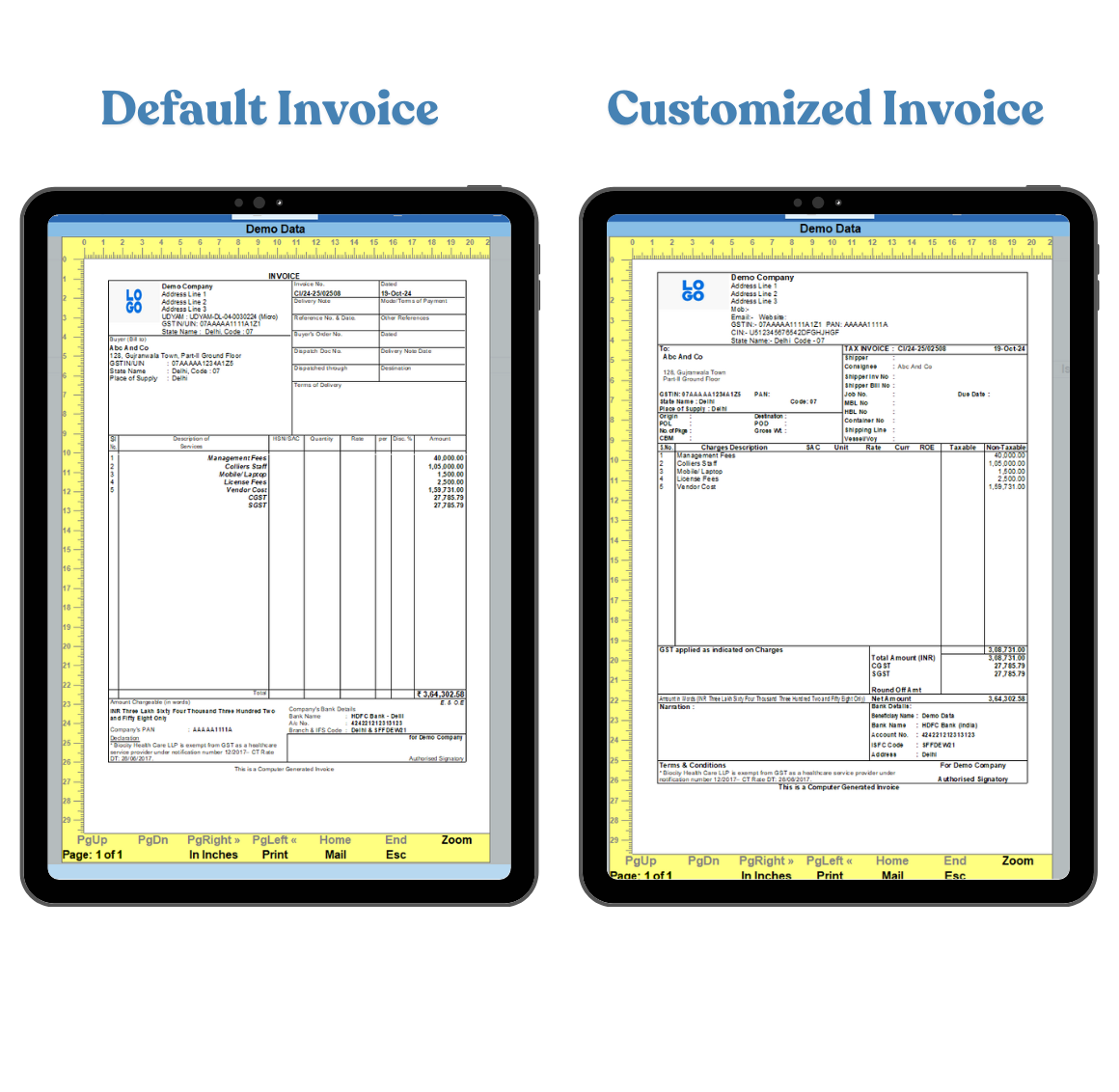
When standard TallyPrime invoices do not match your billing workflow.
TallyPrime is powerful, but every business prints invoices differently. Your team may need specific GST fields, customer details, item columns, dispatch information, payment terms, or branded layouts that standard formats do not cover cleanly.
Generic invoice format
The default print may not show the fields, sequence, labels, or layout your customers expect.
GST and tax details
GSTIN, HSN/SAC, tax split, e-invoice, QR, and transport details may need clearer placement.
Missing item columns
Batch, serial number, size, color, discount, warranty, or product-specific columns may be needed.
Brand and print mismatch
Logo, footer text, terms, signatures, and multi-copy print formats may need a professional layout.
What can be customized in a TallyPrime invoice?
We map each invoice format around your billing process, statutory fields, customer expectations, and print or email workflow.
GST fields
GSTIN, HSN/SAC, tax ledgers, place of supply, reverse charge notes, and tax summaries.
Item columns
Batch, serial, size, color, quantity, rate, discount, description, and product-level details.
QR and e-invoice details
QR code placement, IRN references, acknowledgement details, and print-friendly compliance blocks.
Transport details
Vehicle number, delivery address, dispatch notes, e-way bill references, and shipping information.
Branding
Logo, letterhead style, colors, fonts, header alignment, footer text, and declaration blocks.
Numbering and labels
Custom labels, voucher naming, invoice numbering, alternate captions, and print copies.
Customer-wise formats
Different print formats for retail, B2B, export, distributor, branch, or customer-specific billing.
Print and email output
PDF layout, page breaks, multi-copy formats, print alignment, and email-ready invoice output.
A reliable invoice customization starts with three checks.
The right format depends on what your team bills, what customers need to see, and how the invoice is printed, shared, or audited.
Invoice purpose and format
Confirm whether the format is for tax invoice, proforma, retail, export, service, branch, job work, or customer-specific billing.
Required fields and data source
Map which fields come from vouchers, ledgers, item masters, tax details, dispatch records, or custom fields.
Print and approval workflow
Review print copies, PDF output, page breaks, email sharing, signature blocks, and internal approval needs.
Invoice formats for different billing realities.
Use your current sample invoice, customer requirement, or print challenge as the starting point. We translate it into a practical TallyPrime invoice customization scope.
How your TallyPrime invoice customization project works.
A simple implementation path keeps the format practical, testable, and easier for your billing team to adopt.
Share sample invoice
Send the current print format, required fields, logo, terms, and any customer-specific instructions.
Map fields and rules
We review where each value should come from in TallyPrime and note dependencies or custom fields.
Customize layout
The print format is built around field placement, labels, columns, header, footer, and page behavior.
Test sample prints
We validate the format with sample vouchers, GST details, page breaks, PDF output, and print alignment.
Implement and support
Your team gets implementation guidance, handover, and support for refinements after go-live.
Invoice customization outcomes businesses usually need.
These examples show how invoice customization can reduce manual edits and make billing output easier to use.

Garment manufacturer and trader
Invoice print formats often need size, color, style, batch, brand, transport, and customer-specific columns.
- Cleaner item-level visibility
- Better customer-facing print layout

Service and agency billing
Service invoices may need period-wise billing, project references, tax notes, terms, and professional PDF output.
- Better invoice presentation
- Less manual correction after billing
Invoice customization guides.
Useful reading for teams comparing invoice formats, GST fields, templates, and TallyPrime billing workflows.
TallyPrime invoice customization FAQs.
Short answers to common questions businesses ask before customizing invoice formats in TallyPrime.
Can TallyPrime invoice formats be customized?
Yes. TallyPrime invoice formats can be customized for GST fields, columns, headers, footers, QR codes, transport information, customer-specific details, branding, and print layout requirements. Read more about creating invoices in TallyPrime.
Can GST details be added or rearranged in a TallyPrime invoice?
Yes. GSTIN, HSN/SAC, tax breakup, place of supply, e-invoice details, declaration text, and related fields can be arranged according to your invoice format requirement. See the GST invoice format guide.
Can we add QR codes or payment details to invoices?
QR codes, payment instructions, bank details, UPI information, and customer-facing payment references can be planned in the invoice print format when the required source data is available.
Can different customers or branches have different invoice formats?
Yes. Alternate invoice formats can be created for selected customers, branches, divisions, voucher types, or business scenarios when the rules are clearly defined.
Can item columns such as batch, size, color, or serial number be added?
Yes. Item-level fields such as batch, size, color, serial number, warranty, discount, product description, and custom columns can be added when those details are available in TallyPrime or through customization.
Is invoice customization safe for existing TallyPrime data?
Invoice print customization usually changes the output format rather than your accounting data. Still, sample testing and backups are recommended before implementing changes in live billing.
How long does TallyPrime invoice customization take?
The timeline depends on the number of invoice formats, field complexity, GST requirements, custom fields, print copies, testing scenarios, and approval cycles.
Can invoice customization work with Excel import or API integration?
Yes. Invoice formats can be planned alongside Excel to Tally import or TallyPrime API integration when billing data is coming from another system.
Related TallyPrime services.
Invoice customization often connects with fields, reports, imports, and integrations.
Need your TallyPrime invoice to match your business format?
Share your current invoice sample, required fields, GST details, print issues, or customer-specific requirements. We will review the format and suggest a practical customization approach.
