Growing business Tally review
Your business has changed. Your Tally setup should not stay frozen in the past.
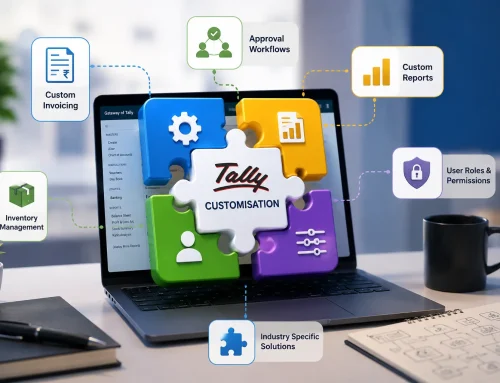
When processes grow around branches, approvals, custom invoices, inventory controls, MIS reports, and repetitive work, default TallyPrime may need customization so teams stop working around the software.
Quick Answer: When Should a Growing Business Customize TallyPrime?
A growing business should consider TallyPrime customization when the default setup no longer matches its invoices, reports, approvals, inventory tracking, data fields, controls, or daily workflows. The goal is not to make Tally complicated. The goal is to make Tally support the way the business now operates.
If teams are maintaining Excel sheets beside Tally, manually preparing MIS, using WhatsApp for approvals, or repeating the same entries, the business has probably outgrown its old setup.
When a business first starts using TallyPrime, the standard setup may be enough. Basic accounting, invoicing, GST, and inventory management work well for a small team with simple processes.
But businesses do not stay the same. New products are added. Branches open. Teams grow. Approval workflows appear. Owners ask for sharper MIS reports. Customers need different invoice formats. Inventory tracking becomes more specific.
Yet many businesses continue using the same default Tally setup they implemented years ago. The result is simple: teams start working around Tally instead of working with it.
Signs Your Business Has Outgrown Standard Tally
These are not always software problems. Often, they are signs that the business process has changed but the TallyPrime configuration has not kept up.
| Warning sign | What it usually means | Possible customization |
|---|---|---|
| Excel is maintained beside Tally | Tally does not capture or show all decision-ready information. | Custom fields, reports, dashboards, or import workflows. |
| Invoices need manual editing | The default print format does not match customer, brand, or compliance needs. | Custom invoice format and print configuration. |
| MIS reports take hours | Management needs views that are not available in default reports. | Custom MIS and report customization. |
| Approvals happen outside Tally | Purchase, sales, discount, or payment controls are not built into the workflow. | Approval workflows and user-level controls. |
| Repetitive data entry is common | Manual work is filling the gap between systems or departments. | Automation, imports, API integration, or validation rules. |
Why the Default Setup Starts Falling Behind
Default TallyPrime is powerful, but it is designed to serve many types of businesses. Your business may have its own billing rules, inventory categories, approval levels, branch reporting, security needs, and management questions.
As operations grow, small process gaps become daily friction. One person exports reports. Another person cleans Excel. Someone else checks approvals on email. A manager asks for numbers that have to be prepared manually every week.
Plain truth: If the same manual correction is happening every month, it is no longer a small task. It is a process gap waiting to be solved.
Are your teams working around Tally instead of inside it?
Review whether custom reports, invoice formats, fields, approvals, or automation can reduce daily manual work without replacing your existing TallyPrime system.
What Can Be Customized in TallyPrime?
Tally customization should be led by business use cases, not by adding features for the sake of it. The best customizations remove friction, improve accuracy, or make reports easier to trust.
InvoicesBusiness-specific invoice formatsCreate print formats that match branding, customer requirements, e-invoice fields, and operational details.
Is Tally Customization Worth It?
For a growing business, Tally customization is worth reviewing when manual work, reporting delays, duplicate entry, or process workarounds are costing more than the customization itself.
| Current situation | Hidden cost | Customization benefit |
|---|---|---|
| Reports are prepared manually | Owners wait for numbers, and employees spend time cleaning data. | Faster MIS and more consistent reporting. |
| Approvals are informal | Exceptions, discounts, purchases, or payments may bypass controls. | Clearer workflow and accountability. |
| Invoices are edited outside Tally | Branding, compliance fields, and customer requirements become manual tasks. | Cleaner billing and fewer format errors. |
| Excel carries extra business logic | Important decisions depend on files outside the accounting system. | Better visibility inside TallyPrime. |
Customization vs Replacing Tally with an ERP
Many growing businesses assume that if TallyPrime does not match every process, they need a large ERP. Sometimes that may be true. But often, the smarter first step is to evaluate whether the current Tally setup can be customized.
Customization can be a better fit when the accounting foundation is working, but the business needs better reports, invoice formats, workflows, controls, fields, or integrations around it.
| Option | Best fit | Watch out for |
|---|---|---|
| Continue with default Tally | Small teams with simple accounting and reporting needs. | Manual work can grow quietly as the business expands. |
| Customize TallyPrime | Growing businesses that need Tally to match existing processes better. | Scope should be clearly defined around real business outcomes. |
| Move to ERP | Complex organizations with broad operational requirements beyond Tally. | Higher cost, longer implementation, and change-management effort. |
Before replacing Tally, check whether it can be tailored.
Many report, invoice, approval, and repetitive data-entry problems can be solved with focused customization instead of a full software change.
A Better Process for Planning Tally Customization
- List the recurring friction: Identify reports, invoice edits, approvals, data entry, and Excel workarounds that repeat every week or month.
- Map the actual workflow: Understand how sales, purchase, inventory, finance, branches, and management currently use TallyPrime.
- Separate must-have from nice-to-have: Focus on changes that reduce errors, save time, improve control, or speed up decisions.
- Design the customization: Define fields, reports, formats, validations, permissions, or integrations before development starts.
- Test with real data: Validate the output with actual invoices, ledgers, items, and reports.
- Train the team: Make sure users understand the new workflow so the customization becomes part of daily work.
Related Services
ReportsTallyPrime report customizationCreate MIS and management views that reduce spreadsheet preparation.
InvoicesTallyPrime invoice customizationDesign invoices around branding, customer, compliance, and operational requirements.
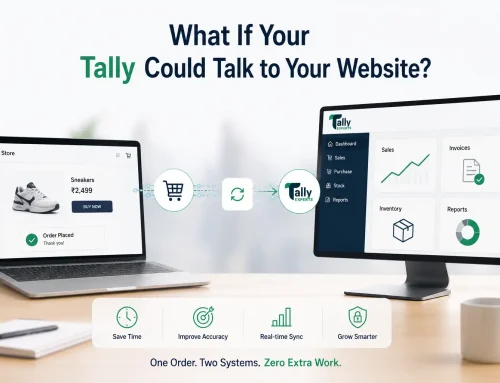
IntegrationTallyPrime API integrationReduce repetitive entry by connecting TallyPrime with other business systems.
Want TallyPrime to match how your business works today?
Share your current reports, invoice formats, approval needs, Excel workarounds, and repetitive tasks. We can help you decide what should be customized and what should stay simple.
Final Thoughts
If your business has evolved but your Tally setup has not, the issue may not be TallyPrime itself. The issue may be that your current setup still reflects an older version of your business.
Instead of forcing people to adjust the business around software, Tally customization can help the software support the way the business actually works now.
Tally Customization FAQs
When should a business customize TallyPrime?
Customization is worth reviewing when reports, invoice formats, approvals, inventory tracking, fields, or workflows no longer match how the business operates.
Can TallyPrime reports be customized?
Yes. Custom MIS reports can be built around sales, stock, receivables, branches, profitability, exception areas, and management review needs.
Can invoice formats be changed in TallyPrime?
Yes. Invoice layouts can be customized for branding, customer requirements, additional fields, item details, tax information, and operational formats.
Is customization better than moving to ERP?
It depends on business complexity. If the accounting foundation is working, focused Tally customization may solve many workflow gaps before a larger ERP move is needed.
Can customization reduce Excel dependency?
Yes. Custom reports, fields, validations, imports, and integrations can reduce the need to maintain separate Excel sheets beside TallyPrime.
What should be checked before customizing Tally?
Review current workflows, recurring manual work, report needs, invoice formats, controls, user roles, data quality, and the expected business outcome.