Excel to Tally data migration
15,000 rows are not the problem. Unchecked data is.
Yes, large Excel files can be imported into TallyPrime. The real question is whether ledgers, GST details, voucher structure, inventory units, opening balances, and duplicates have been cleaned before the import starts.
Quick Answer: Can 15,000 Excel Rows Be Imported into Tally Without Errors?
Yes, 15,000 Excel rows can be imported into TallyPrime without major errors when the data is cleaned, mapped, validated, tested, and reconciled before the final import. Tally can handle the volume. The risk usually comes from duplicate ledgers, wrong GST mapping, inconsistent item names, missing voucher fields, and opening balance mismatches.
A clean import is not just a file conversion job. It is a data validation and migration exercise.
A business owner once asked us a simple question: “We have around 15,000 rows of transactions in Excel. Can we import them into Tally?”
The short answer is yes. The better answer is that the success of the import depends less on the number of rows and more on the quality of the data behind those rows.
Importing 15,000 rows is usually not the hard part. Importing them correctly, with usable reports after migration, is where the real work begins.
Why Large Excel Files Are Not the Main Problem
Most businesses do not suddenly create a 15,000-row spreadsheet. The file grows over months or years as teams keep adding sales, purchases, inventory movements, customer balances, vendor records, GST details, and internal references.
Excel feels convenient until the business wants TallyPrime to become the single source of truth. That is when questions become sharper:
- Will customer and vendor ledgers map correctly?
- Will GST reports remain accurate after migration?
- Will inventory quantities, units, and item names match?
- Will opening balances reconcile with financial statements?
- Will the team need to manually repair hundreds of entries after import?
These questions are not about volume. They are about structure.
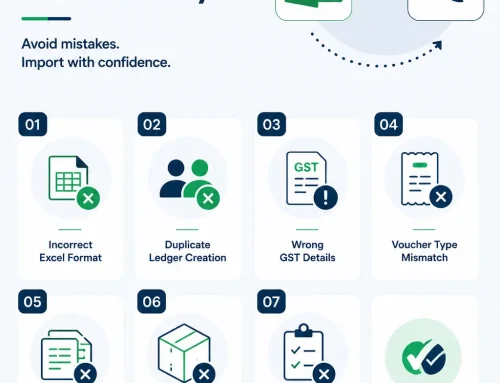
The Most Common Excel to Tally Import Errors
| Import issue | What it looks like in Excel | What happens inside TallyPrime |
|---|---|---|
| Duplicate ledger names | ABC Traders, A.B.C. Traders, and ABC Traders Pvt Ltd are used for the same party. | Balances split across multiple ledgers and reports become unreliable. |
| Wrong GST mapping | GST rates, registration type, GSTIN, HSN, or SAC details are missing or inconsistent. | GST reports may need manual correction before filing. |
| Incomplete voucher fields | Dates, invoice numbers, voucher types, references, or narration fields are missing. | Entries may fail import or create incomplete transaction records. |
| Inventory mismatch | Item names, stock groups, units, and quantities are not standardized. | Stock reports, valuation, and item-wise sales reports can become inaccurate. |
| Formula or format errors | Hidden formulas, merged cells, text dates, extra spaces, and special characters exist in the sheet. | Data may import incorrectly even when the spreadsheet looks clean. |
Can TallyPrime Handle 15,000 Rows?
Yes. TallyPrime can handle much larger datasets when the import structure is correct. We regularly see businesses import sales vouchers, purchase vouchers, journal entries, customer ledgers, vendor masters, inventory masters, opening balances, and historical transactions.
The important part is not whether Tally can accept the rows. The important part is whether those rows have been prepared in the format TallyPrime expects.
Practical rule: Do not judge readiness by how neat the Excel file looks. Judge it by whether every ledger, tax field, item, voucher type, and balance can be mapped and reconciled.
Have a large Excel file ready for Tally import?
Before importing, review ledger names, GST fields, item masters, voucher structure, and opening balances so the migration does not turn into days of cleanup.
What Should Be Checked Before Importing Excel into Tally?
A few hours spent validating data before import can save days of corrections later. This is the minimum review businesses should complete before moving a large file into TallyPrime.
| Area to check | What to validate | Why it matters |
|---|---|---|
| Ledger structure | Customer, vendor, expense, income, duties, taxes, bank, and cash ledgers. | Prevents duplicate masters and wrong grouping. |
| GST details | GSTIN, registration type, place of supply, HSN/SAC, tax rates, and taxable values. | Protects GST reporting and compliance output. |
| Inventory masters | Item names, stock groups, units of measurement, batches, rates, and opening quantities. | Protects stock reports and valuation. |
| Voucher mapping | Sales, purchase, receipt, payment, journal, debit note, credit note, and contra rules. | Ensures entries land in the right voucher type. |
| Opening balances | Ledger balances, stock balances, receivables, payables, and bank balances. | Ensures Tally reports match existing business records. |
| Duplicates and blanks | Duplicate rows, missing mandatory fields, extra spaces, inconsistent dates, and hidden formulas. | Reduces import failures and post-import repair work. |
Should You Import All 15,000 Rows?
Not always. This surprises many business owners, but importing everything is not always the smartest migration plan.
Sometimes a full historical import is necessary for audit, reporting, or continuity. In other cases, the better approach is to import masters, opening balances, and current-year transactions while keeping older Excel records archived for reference.
| Import scope | Best fit | Watch out for |
|---|---|---|
| Full historical import | When past transactions must be reportable inside TallyPrime. | Requires stronger validation because old errors also move into Tally. |
| Masters plus opening balances | When the business wants a clean start with reliable current balances. | Opening balances must reconcile perfectly. |
| Current-year transactions | When recent operations and reporting matter most. | Needs clear cutoff dates and audited prior balances. |
| Hybrid migration | When selected history matters, but not every row needs to move. | Good balance between accuracy, speed, and usability. |
A Safer Excel to Tally Import Process
- Understand the business requirement: Decide whether the goal is migration, reporting, audit continuity, stock setup, GST cleanup, or operational improvement.
- Review the Excel file: Check column structure, mandatory fields, formats, formulas, duplicate records, and naming conventions.
- Map data to TallyPrime: Align ledgers, voucher types, stock items, tax fields, groups, cost centers, and other masters.
- Clean and standardize data: Remove duplicates, fix spelling variations, validate GST fields, and normalize date, amount, and quantity formats.
- Run a test import: Import a sample or controlled dataset before touching the final company data.
- Reconcile results: Compare totals, balances, stock, tax values, and report output between Excel and TallyPrime.
- Complete the final import: Move the approved dataset only after validation and reconciliation are complete.
Not sure whether to import everything or start clean?
Review your audit needs, reporting goals, data quality, and current-year requirements before choosing full migration, selective migration, or opening balance setup.
What a Successful Import Should Deliver
A successful Excel to Tally import should not only say “import complete.” It should leave the business with numbers it can actually trust.
Related Guides and Services
MigrationDiscuss data migrationDiscuss migration scope, data validation and post-migration checks.
IntegrationLive Tally integration vs Excel importsUnderstand when repeated Excel uploads should become automated sync.
APITally API integration challengesReview common data mapping and automation issues before connecting systems.
Want to import Excel data into TallyPrime without cleanup chaos?
Share your Excel file structure, row count, voucher types, GST fields, inventory details, and reporting requirement. We can help you decide the safest import path before the final migration.
Final Thoughts
If you have 15,000 rows in Excel and want to import them into TallyPrime, the answer is almost certainly yes. But the smarter question is whether the data is ready for Tally.
The success of the import is not decided by the row count. It is decided by the quality of ledger mapping, GST validation, inventory structure, voucher formatting, and reconciliation.
Get those right first, and the import becomes a controlled migration instead of a long correction exercise.
Excel to Tally Import FAQs
Can 15,000 Excel rows be imported into TallyPrime?
Yes. TallyPrime can handle large imports when the Excel data is cleaned, mapped, validated, tested, and reconciled before final migration.
What causes errors during Excel to Tally import?
Common causes include duplicate ledgers, missing GST fields, wrong voucher mapping, inconsistent dates, inventory unit mismatch, formula errors, and incomplete opening balances.
Should all historical Excel data be imported into Tally?
Not always. Some businesses need full historical import, while others are better served by importing masters, opening balances, and current-year transactions.
Can GST data be imported from Excel to Tally?
Yes, but GSTIN, registration type, place of supply, HSN or SAC, tax rates, taxable values, and voucher mapping should be checked carefully.
How do we know the import was successful?
Compare Excel totals with Tally reports after import, including ledgers, inventory, taxable values, GST output, receivables, payables, and opening balances.
Can Tally Experts help clean the Excel file before import?
Yes. The import process can include file review, data cleanup, mapping, test import, final import, and reconciliation checks.