Tally Integrations: 10 Types of Applications You Can Connect with TallyPrime

Tally integrations connect TallyPrime with the other software your business uses, so orders, invoices, payments, stock and salaries reach your books without being typed again. Most businesses keep sales, store, warehouse or payroll data in separate apps; an integration moves the agreed records into TallyPrime, and can send figures back.
This guide lists 10 types of applications you can connect, the common ways to connect them, and what to plan before you start.
What Tally Integrations Are
An integration is a defined flow of data between TallyPrime and another system: which records move, in which direction, how often, and what happens when a record fails. It can be as simple as a regular Excel import or as automated as an API that posts each order as it happens.
10 Applications You Can Connect
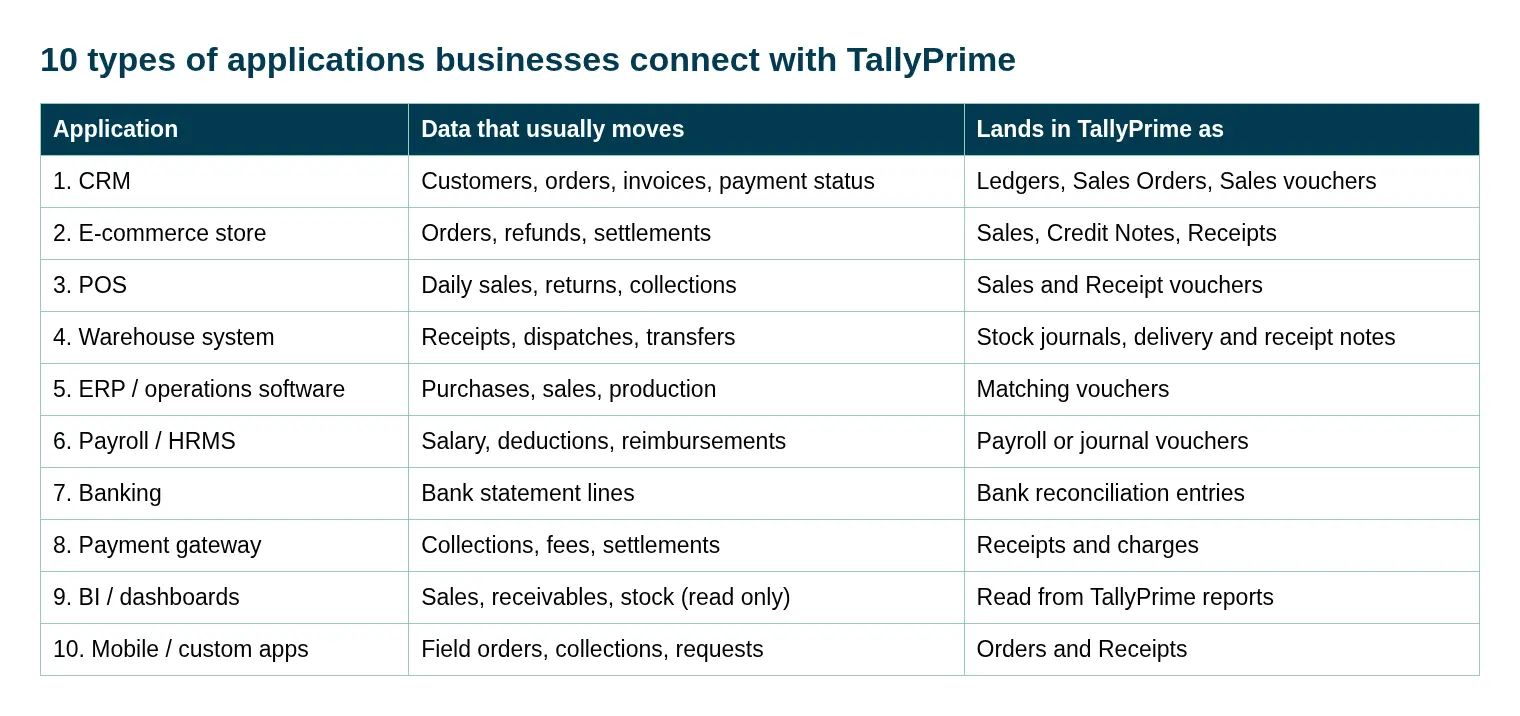
- CRM (for example Zoho CRM, HubSpot or Salesforce): customers and won deals become ledgers and sales vouchers. See Zoho CRM Tally integration.
- E-commerce store (for example Shopify or WooCommerce): orders, refunds and settlements post as sales, credit notes and receipts. See Tally and Shopify integration.
- POS: daily store sales, returns and collections.
- Warehouse system: receipts, dispatches and stock transfers.
- ERP or operations software: purchase, sales and production entries, while TallyPrime stays the books of account.
- Payroll or HRMS: salary, deductions and reimbursements as payroll or journal vouchers.
- Banking: statement lines for bank reconciliation.
- Payment gateway: collections, gateway fees and settlements.
- BI and dashboards (for example Power BI): read TallyPrime data for reports.
- Mobile and custom apps: field orders, collections, dealer or customer portals.
Field sales app and sales order app integration with Tally
A field sales app or sales order app lets reps book orders at the customer's site. With Tally integration, each order can post as a Sales Order voucher against the right party and items, and stock or outstanding from TallyPrime can be shown in the app before the rep confirms the order.
Mobile billing app integration with Tally
A mobile billing app raises invoices on a phone or tablet. Integrated with TallyPrime, each bill can post as a sales voucher with the same item, HSN/SAC and GST ledgers, so numbering and tax stay consistent with your books.
Payment collection app integration with Tally
A payment collection app records cash, cheque or online payments collected in the field. Through the integration, each collection can post as a Receipt voucher against the customer's bill, so outstanding in TallyPrime stays current.
Spend management software integration with Tally
Spend management software tracks employee expenses, cards and approvals. After approval, each expense can post to TallyPrime as a payment or journal voucher with the right expense ledger, GST input and cost centre.
How Applications Connect with TallyPrime
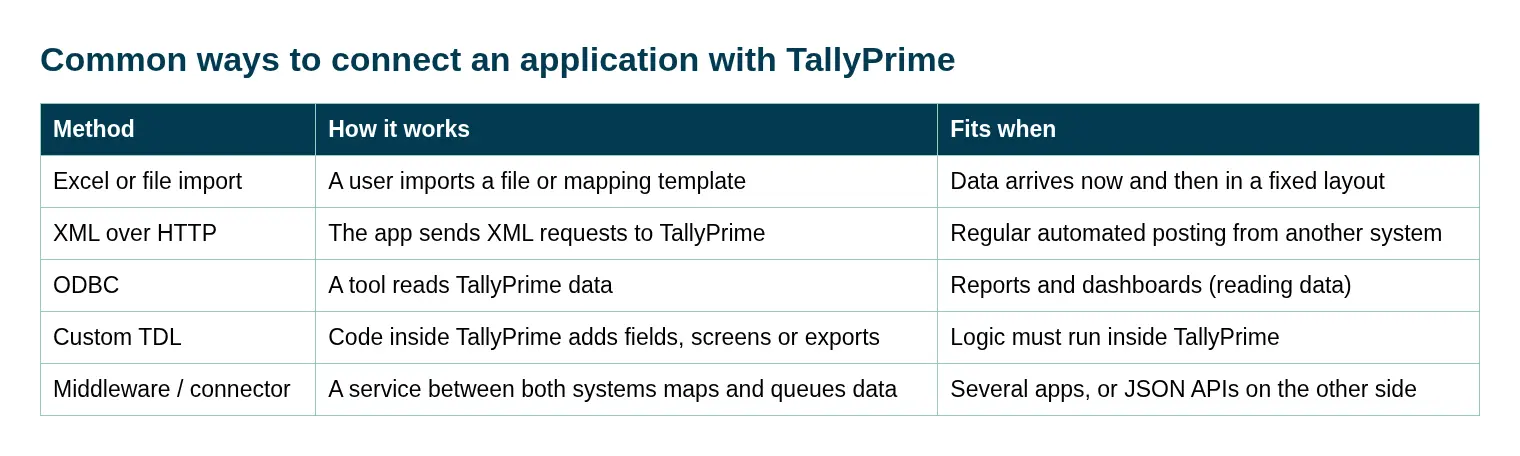
Modern apps usually expose REST APIs that use JSON. For a Tally API integration, TallyPrime commonly takes data as XML, so a connector or middleware often converts between the two. For a side-by-side view, see Tally Integration with Web Applications (ERP, CRM, Billing, Ecom Etc.). When you need it built for your process, our custom Tally integration service covers design, build and support.
One-Way vs Two-Way Sync
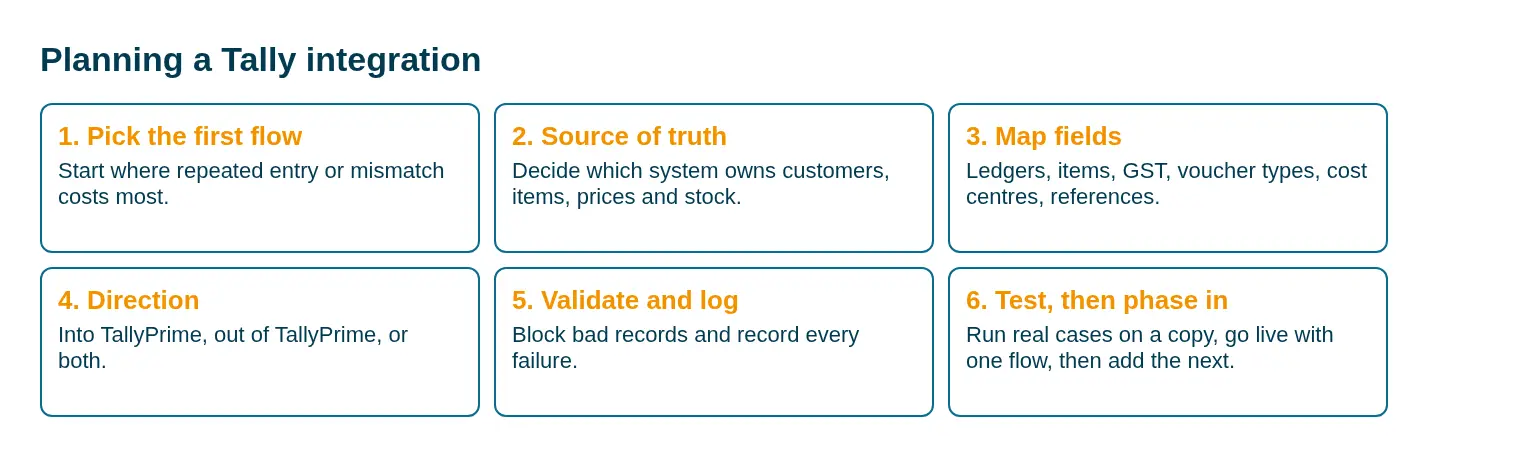
One-way sends data in one direction, usually into TallyPrime. It is simpler and easier to control. Two-way also sends data back, such as stock, outstanding or payment status. It needs clear rules on which system owns each field, so values are not overwritten.
Masters, Vouchers and Field Mapping
- Masters first: customers, suppliers, items, units and GST ledgers must exist or be created by the integration with matching rules.
- Then vouchers: each document type maps to a voucher type, for example order to Sales Order, invoice to Sales, refund to Credit Note.
- Field mapping: party, item, quantity, rate, discount, HSN/SAC, tax ledger, date, number and reference each need one clear target.
Validation, Security and Testing
- Hold records with missing GSTIN, ledgers, items or wrong dates.
- Stop duplicates by storing each source record ID with its voucher.
- Keep a log, alerts and a retry rule for failed records.
- Keep API keys in the integration layer and give it only the access it needs.
- Back up the company and test real cases on a copy: returns, part payments, cancellations and inter-state sales.
Planning Your First Integration
Common Mistakes to Avoid
- Connecting systems before cleaning masters, so duplicates move faster.
- Ignoring GST and voucher rules, so entries sync but reports are wrong.
- No error handling, so failed records go unnoticed.
- Trying to connect everything at once.
What Decides Scope and Cost
- Number of applications and records per day.
- One-way or two-way, and how often data syncs.
- Whether the other app has an API, and in what format.
- Custom fields, approval steps and GST cases.
- Where TallyPrime runs: a single PC, a server or cloud.
For integration and import methods compared, read Excel to Tally Integration Methods: XML, Custom Utilities & API....
Conclusion
TallyPrime can work with CRM, e-commerce, POS, warehouse, payroll, banking, BI and custom apps. Pick the flow that costs you most time, agree the source of truth and mapping, test on a copy, and add more integrations one at a time.
You can connect with us on WhatsApp. Say Hi
FAQs on Tally Integrations
1. Can Tally be integrated with other software?
Yes. TallyPrime can exchange data with other software through file imports, XML over HTTP, ODBC, custom TDL or a middleware that connects to the other system's API.
2. Which applications are most commonly integrated with Tally?
CRM, e-commerce stores, POS, warehouse and ERP software, payroll, banking, payment gateways, BI tools and mobile or custom apps.
3. Does TallyPrime have a REST API?
TallyPrime is commonly integrated by sending XML requests over HTTP. When the other app uses JSON REST APIs, a connector or middleware usually converts between the two.
4. Is one-way or two-way sync better?
Start with one-way into TallyPrime for most flows. Add two-way only for the fields sales or operations really need back, such as stock or outstanding.
5. What should be checked before integrating?
Master data quality, voucher mapping, GST rules, sync direction, duplicate handling, error logs, data volume and test cases.
6. Can Tally sync with other accounting software?
Yes, with an integration that maps ledgers, vouchers and GST between the two systems. Decide which one keeps the books of record so entries are not posted twice.
7. What is Tally API integration?
It is connecting another app to TallyPrime through its XML-over-HTTP interface, often with middleware that converts the app's JSON API data to XML and posts it as masters or vouchers.
Continue Reading
Get a personal consultation.
Call us today at +919211044269
Want our TallyPrime tips in Google first? Add us as a preferred source.