Multi-User Auto Numbering in TallyPrime: Stop Duplicate and Missing Voucher Numbers

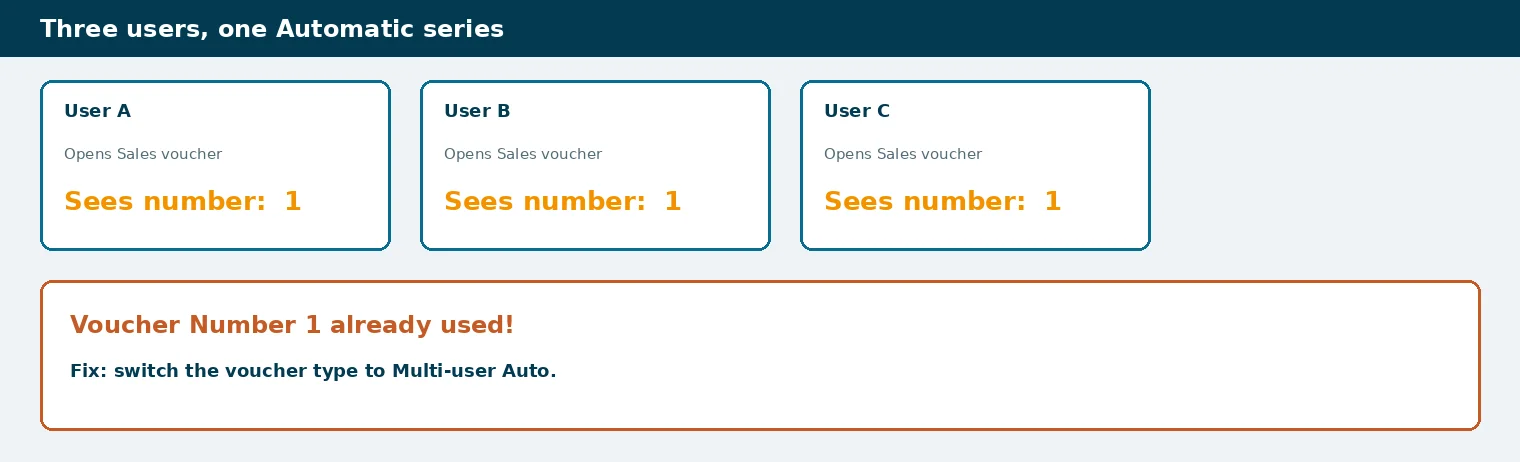
When one person enters invoices, voucher numbering in TallyPrime rarely causes trouble. Put three people on the same sales series and it starts: "Voucher Number 1 already used!", invoices that change number after a deletion, and the odd duplicate that turns up at audit time.
This guide is about that multi-user side: Multi-user Auto numbering, duplicate prevention, and what happens when vouchers are deleted. For the full list of numbering methods, prefixes and numbering series, see our main guide, Voucher Numbering in TallyPrime: Methods, GST and Audit.
The multi-user numbering problem
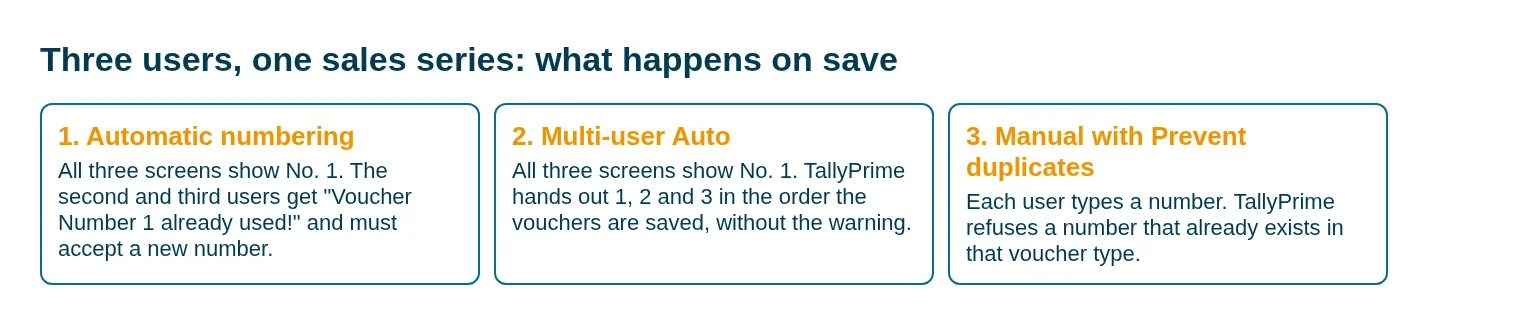
With plain Automatic numbering, each user's screen shows the next free number when they open a new voucher. If two people open a voucher at the same moment, both see the same number. The first to save gets it. The second gets a warning and a new number. It works, but it is slow and confusing on busy days.
Which numbering method to use
- Automatic. Fine for one user per voucher type.
- Automatic (Manual Override). Automatic, but a user can type a different number. Turn on duplicate prevention if you use it.
- Manual. For numbers that come from somewhere else, such as a printed book or another system.
- Multi-user Auto. An extension of Automatic for several users. The number is allotted when the voucher is saved.
- None. No numbering. Rarely the right choice for invoices.
How to set up Multi-user Auto
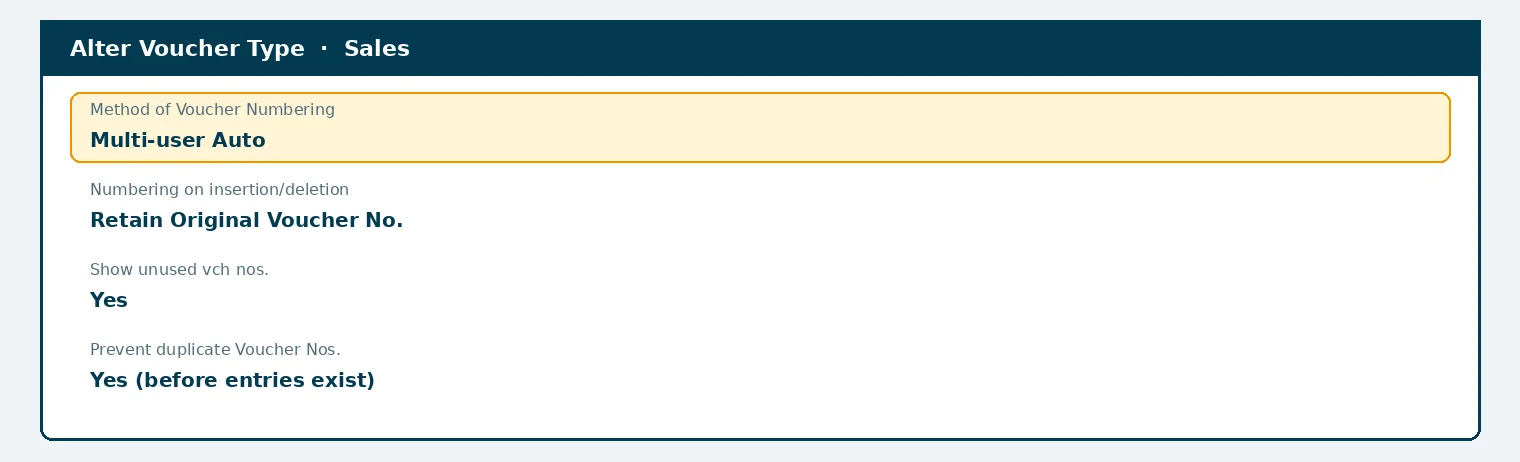
Recommended voucher type settings for multi-user offices
| Setting (Alt+G > Alter Master > Voucher Type) | Recommended value | Why |
|---|---|---|
| Method of Voucher Numbering | Multi-user Auto for sales and receipts entered by several people | Numbers are allotted on save, so no clash warnings |
| Numbering behaviour on insertion/deletion | Retain Original Voucher No. for GST sales series | Deleting an invoice will not shift the numbers of later invoices |
| Show unused vch nos. in transactions | Yes, if you retain numbers | Lets you reuse a gap left by a deleted or optional voucher |
| Prevent creating duplicate Voucher Nos. | Yes, for Manual or Automatic (Manual Override) | Can only be set before the voucher type has entries |
| Set/Alter additional numbering details | Use for prefix, suffix and restart each financial year | Keeps a clean yearly series such as INV/26-27/001 |
- Press Alt+G (Go To) > Alter Master > Voucher Type and select the voucher type, for example Sales.
- Set Method of Voucher Numbering to Multi-user Auto.
- Choose the Numbering behaviour on insertion/deletion (see below).
- If you want a prefix, suffix or yearly restart, set Set/Alter additional numbering details to Yes and fill in Applicable From, Starting Number, Periodicity and the prefix or suffix.
- Press Ctrl+A to save. Ask two users to save a voucher at the same moment to check it.
Multi-user Auto applies when vouchers are created. It does not change how insertion or deletion is handled. That is the next setting.
Preventing duplicate voucher numbers
For Manual and Automatic (Manual Override), set Prevent creating duplicate Voucher Nos. to Yes. TallyPrime then refuses a number that already exists in that voucher type.
The catch: you can only turn this on before the voucher type has any entries. If your sales voucher type already has invoices, create a new sales voucher type with duplicate prevention on, and use it from a clean date such as the start of a month or financial year.
Renumber or retain on deletion
From TallyPrime 3.0, Automatic and Multi-user Auto have a Numbering behaviour on insertion/deletion option:
- Renumber Vouchers. Delete invoice 2 of 1, 2, 3 and the series becomes 1, 2. Fine for internal vouchers like journals.
- Retain Original Voucher No. Delete invoice 2 and the series stays 1, 3. Use this for sales invoices. Numbers already sent to customers or reported for GST must not change.
With Retain, turn on Show unused vch nos. in transactions so users can see and reuse a gap when that is appropriate.
Common problems and fixes
Common voucher numbering problems and fixes
| What you see | Likely cause | What to do |
|---|---|---|
| "Voucher Number already used" pop-ups | Automatic numbering with several users saving at once | Switch the voucher type to Multi-user Auto |
| Invoice numbers changed after a deletion | Numbering behaviour set to Renumber Vouchers | Use Retain Original Voucher No. for invoice series |
| Two invoices with the same number | Manual numbering without duplicate prevention | Use a new voucher type with Prevent duplicates on, from a fresh date |
| Gaps in the series | Deleted or optional vouchers with Retain Original | Turn on Show unused vch nos. and reuse the gap, or keep a note for audit |
| Same series used by two GST registrations | Numbering series not separated by registration | Set up separate numbering series per registration (TallyPrime 3.0+) |
Changing a setting fixes future entries. Past entries with duplicates or shifted numbers need checking one by one, ideally with your accountant, before you alter anything already reported.
Planning more users? See Tally Prime Subscription Price 2026: Silver, Gold and TSS for licence options. For how TallyPrime helps day-to-day, read Top Benefits of Using Tally.
Conclusion
If more than one person enters the same voucher type, switch it to Multi-user Auto. Use Retain Original Voucher No. for invoice series. Turn on duplicate prevention for any manual numbering, using a fresh voucher type if needed. Those three settings remove most numbering problems in multi-user offices.
Want us to check your setup? Talk to us about TallyPrime licences and setup or message us on WhatsApp.
FAQs on Multi-User Voucher Numbering in TallyPrime
1. What is Multi-user Auto voucher numbering in TallyPrime?
A numbering method for offices where several users enter the same voucher type. TallyPrime allots the number when each voucher is saved, so users do not get "already used" warnings.
2. How do I prevent duplicate voucher numbers in TallyPrime?
In the voucher type, set Prevent creating duplicate Voucher Nos. to Yes. It works with Manual and Automatic (Manual Override), and can only be set before the voucher type has entries.
3. Why did my invoice numbers change after I deleted one?
The voucher type is set to Renumber Vouchers. Change Numbering behaviour on insertion/deletion to Retain Original Voucher No. to keep numbers fixed.
4. How do I enter a voucher number manually in TallyPrime?
Set the method to Manual, or to Automatic (Manual Override) if you want automatic numbers that you can change when needed.
5. How do I restart voucher numbering for a new financial year?
Alter the voucher type, set Set/Alter additional numbering details to Yes, and enter Applicable From, Starting Number 1, Periodicity and any prefix or suffix.
Continue Reading
Get a personal consultation.
Call us today at +919211044269
Want our TallyPrime tips in Google first? Add us as a preferred source.