

How Many Users Can Use TallyPrime Gold? Tally Server vs TallyPrime Gold Explained

TallyPrime Gold is the multi-user edition. One Gold licence lets several computers on the same local network (LAN) work on the same company data. Tally Solutions does not set a fixed user cap on the LAN. In practice the limit is speed. As more people post entries and run reports together, a plain Gold setup slows down. That is where TallyPrime Server comes in.
This guide answers how many users can use TallyPrime Gold, explains the difference between TallyPrime and TallyPrime Server, and gives a checklist to pick one.
How many users can use TallyPrime Gold
Gold is licensed for multiple users on one LAN. Users in other offices or working from home need remote access on top, such as Tally on Cloud, a VPN or a remote desktop setup. How many people can work comfortably depends on your data size, network, the PC that holds the data, and how heavy your reports are. A small team with light, steady use is usually fine. A team of a dozen or more posting all day often starts to feel it.
For the steps to share TallyPrime across computers, see How to Use Tally Multi-User: Step-by-Step Guide.
Difference between TallyPrime and TallyPrime Server
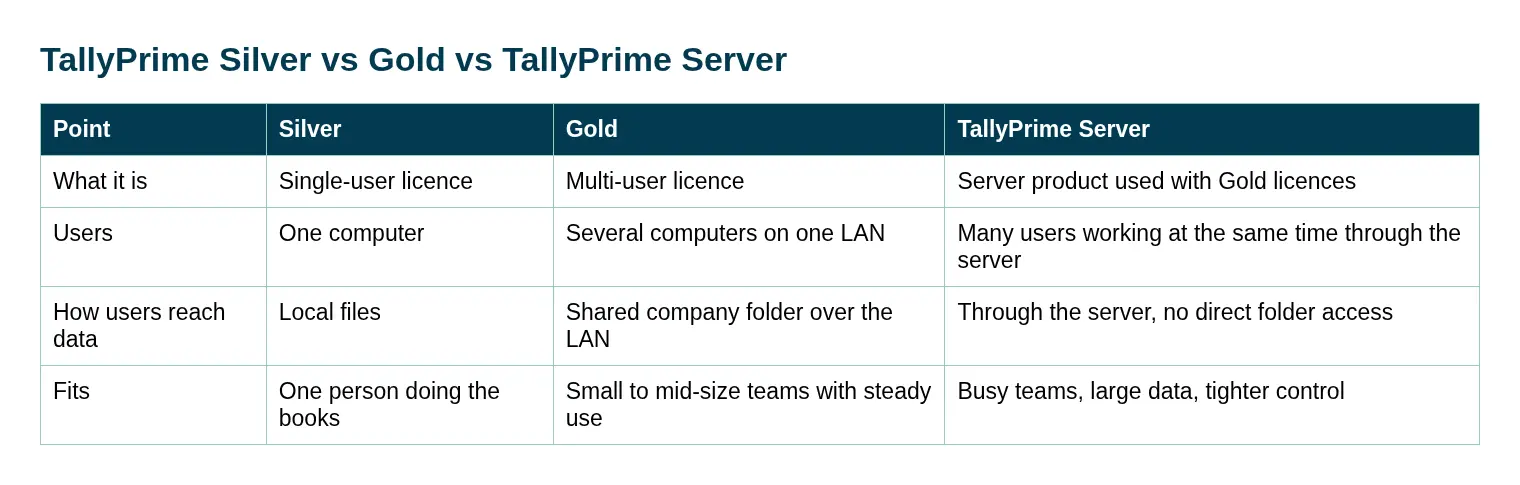
TallyPrime (Silver or Gold) is the accounting software each user runs. TallyPrime Server is a separate product installed on a server machine. It works with Gold licences. With Gold alone, each user's TallyPrime opens company files in a shared folder. With TallyPrime Server, users connect to the server and it handles the data. Users stop competing for the same files, they do not need folder access, and the admin can see who is connected.
Silver vs Gold vs Server
When Gold is enough
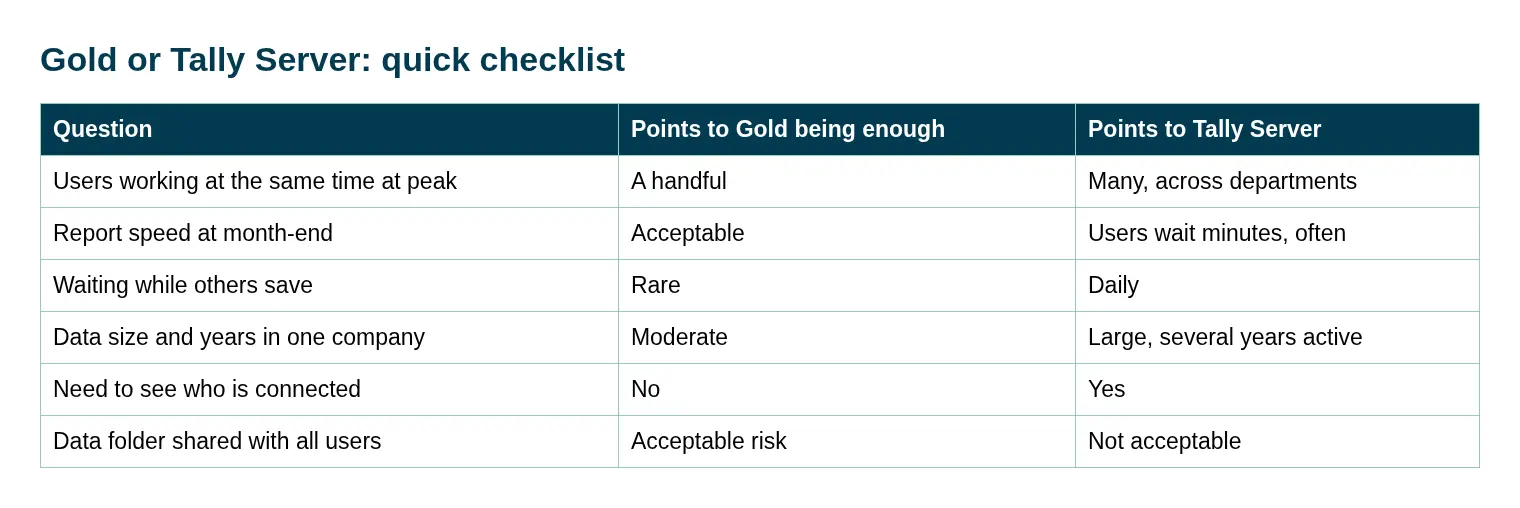
- A small team posts entries through the day without waiting on each other.
- Reports open in reasonable time, even at month-end.
- Company data is moderate, or older years are split off.
- Backup runs after hours and does not stop anyone's work.
When Tally Server is worth it
- Users wait or get locked while someone else saves.
- Month-end reports take minutes, and decisions wait on them.
- Several departments or a branch on the network use the same company.
- You want users kept out of the data folder, and a view of active sessions.
Rule out cheaper causes first. A weak PC holding the data, a slow network switch, or one company holding many years of data can cause the same slowdowns.
Checklist before you decide
Cost and return
Do not compare licence prices alone. Count the time lost. If six people wait 15 minutes a day on slow reports and saves, that is about 30 working hours a month. Add the risk of every user having access to the data folder. Set that against the server licence, hardware or hosting, and setup. For small, light teams, Gold stays the sensible choice. For busy teams, the server often pays for itself.
How to move from Gold to Server
- Review users, data size, network and the slowest reports.
- Size a dedicated server machine and check the LAN.
- Take a full backup and verify the data.
- Install TallyPrime Server, move the companies, and set up users and rights.
- Test with real users at a busy hour, then go live and monitor.
Our Tally Server implementation covers each step. To activate or reconfigure your multi-user licence, read Tally Multi User Activation Process: Step-by-Step Guide.
Conclusion
TallyPrime Gold lets several computers on one LAN share the same data, with no fixed user cap on the LAN. TallyPrime Server is an add-on for Gold that handles many users at once and keeps data out of users' reach. Stay on Gold while the team works smoothly. Review Tally Server when waiting, slow reports or access control start to cost you time.
Want help deciding? Talk to us about Tally Server or message us on .
FAQs on TallyPrime Gold and Tally Server
1. How many users can use TallyPrime Gold?
Gold is the multi-user edition for computers on one LAN, with no fixed user cap there. The practical limit is performance, which depends on data size, network and how many people post and run reports together.
2. What is the difference between TallyPrime and TallyPrime Server?
TallyPrime is the accounting software each user runs. TallyPrime Server is a separate server product used with Gold licences. Users connect to the server instead of opening shared data files.
3. Do I need Gold to use Tally Server?
Yes. TallyPrime Server works with TallyPrime Gold licences. It does not replace them.
4. Can TallyPrime Gold be used from another office?
Gold covers users on one LAN. Users in another office or at home need remote access as well, such as Tally on Cloud or a VPN.
5. What is the difference between Tally Silver and Gold?
Silver is the single-user edition for one computer. Gold is the multi-user edition for several computers on a LAN.
Continue Reading
Get a personal consultation.
Call us today at
Want our TallyPrime tips in Google first? Add us as a preferred source.

