
Tally HubSpot Integration: How to Connect TallyPrime to HubSpot CRM
Tally HubSpot integration connects HubSpot CRM, where your sales team manages contacts, companies and deals, with TallyPrime, where your accounts team keeps ledgers, invoices, GST and receipts. Won deals can become vouchers in TallyPrime, and payment status can flow back to HubSpot, without retyping.
If you want to connect Tally to HubSpot, this guide explains what can sync, how a won deal becomes a voucher, how to map the fields, and what to check and test before go-live.
What Tally HubSpot Integration Means
It is a CRM-to-accounting sync. HubSpot sends agreed records, such as companies and closed deals, to TallyPrime as ledgers and vouchers. TallyPrime can send back information that sales needs, such as whether a customer has paid. The aim is fewer manual entries, faster billing after a deal closes, and both teams seeing the same numbers.
What Can Sync
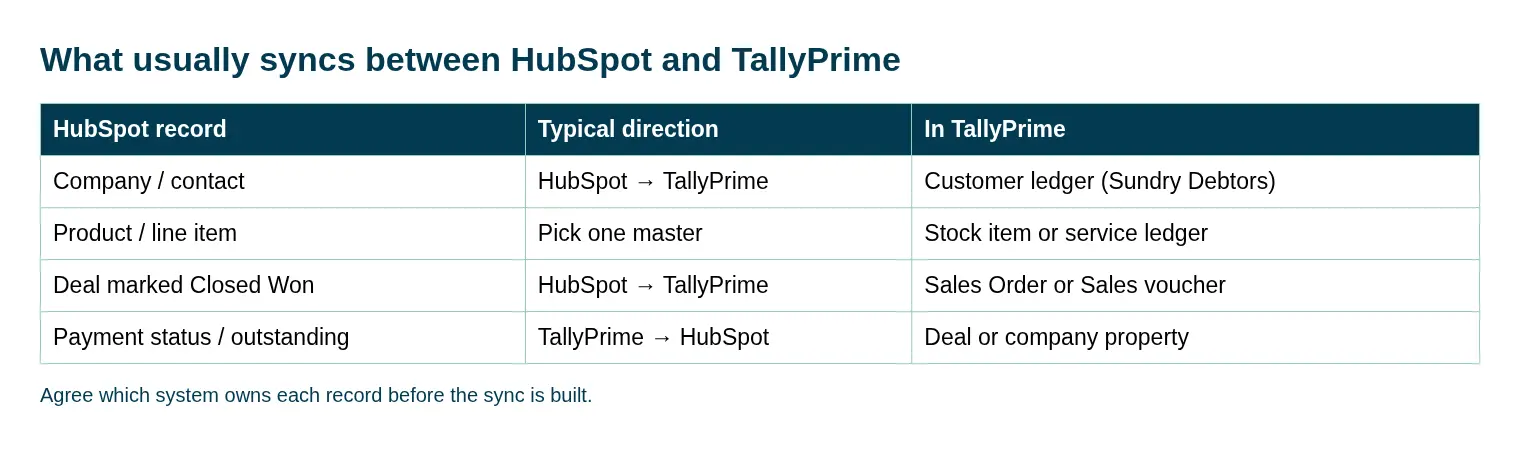
One-Way vs Two-Way Sync
One-way (HubSpot to TallyPrime) covers customers and won deals. It is simpler and keeps finance in control of what posts.
Two-way adds updates from TallyPrime back to HubSpot, such as invoice number, amount paid or overdue status. Decide which system owns each field so that a value edited in one place is not overwritten by the other.
How the Deal-to-Voucher Flow Works
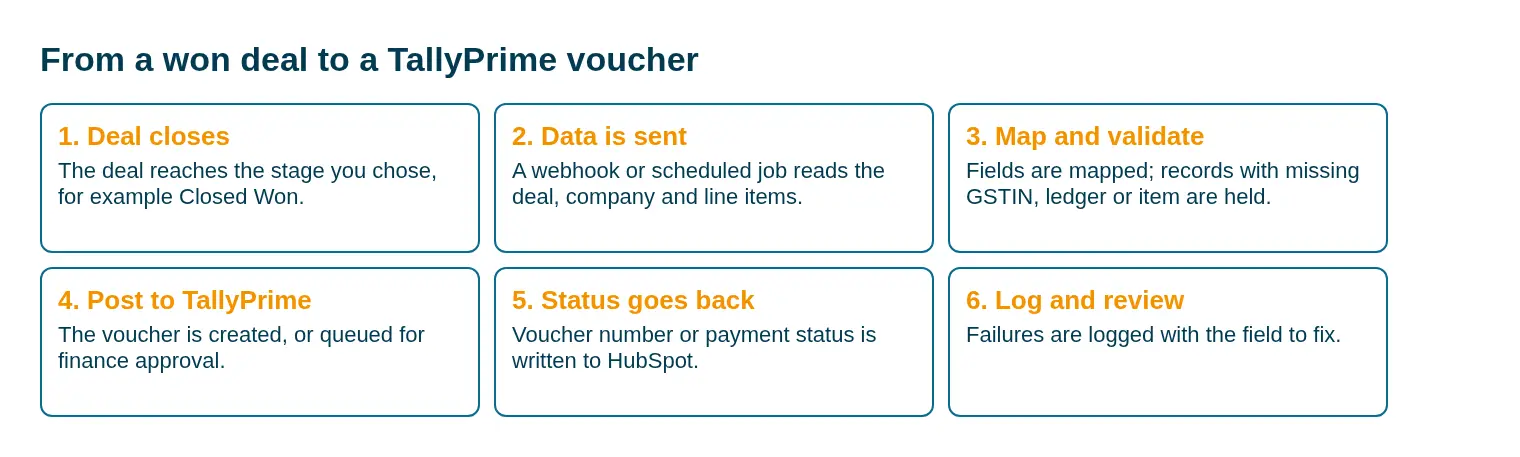
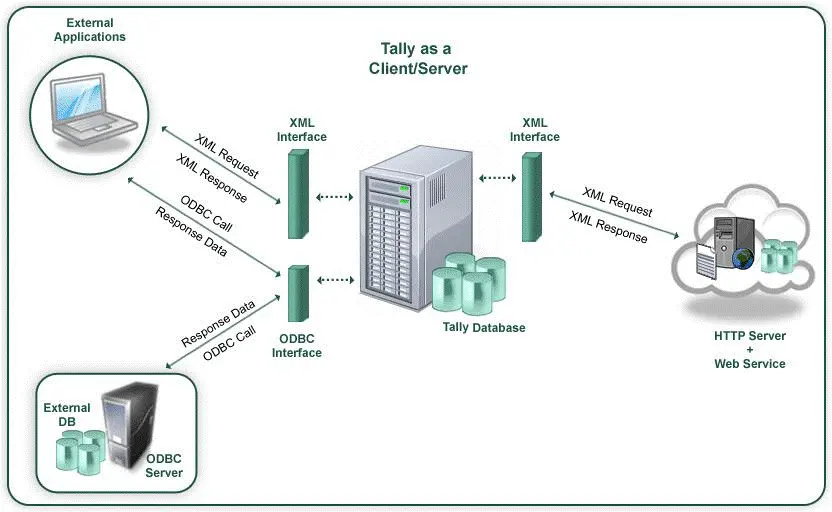
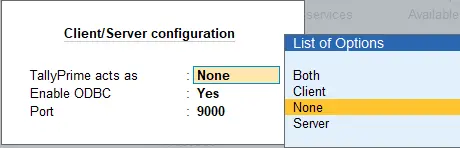
HubSpot offers REST APIs that return JSON, and workflows or webhooks can notify an integration when a deal changes stage. TallyPrime is usually integrated through XML requests over HTTP or custom TDL. The integration layer in the middle reads the HubSpot data, applies your mapping and rules, and posts XML to TallyPrime. To have this built around your process, see our custom Tally integration service.
Mapping HubSpot Fields to TallyPrime
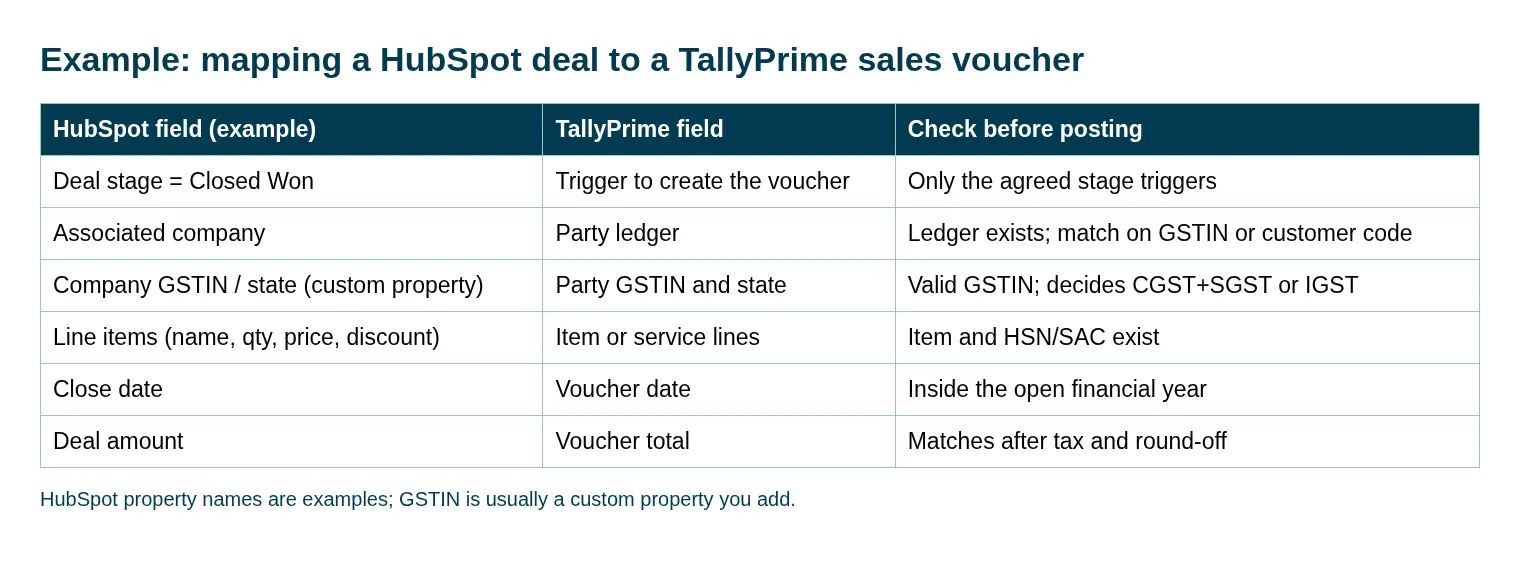
- Company name, billing address, state and GSTIN map to the customer ledger.
- Products or services map to stock items or service ledgers with the right HSN/SAC and GST rate.
- Discounts and round-off map to their own ledgers.
- The deal type decides the voucher type, for example Sales Order or Sales.
Validation and GST Checks
- Match an existing ledger on GSTIN or a customer code before creating a new one.
- Hold the deal if GSTIN, state, item, HSN/SAC or GST ledger is missing.
- Use the place of supply to decide CGST + SGST or IGST.
- Do not post the same deal twice; store the TallyPrime voucher number on the deal.
- Handle cancelled or reopened deals with a credit note rule, not by deleting vouchers.
Security and Access
Keep the HubSpot access token and TallyPrime connection details inside the integration layer. Give it only the HubSpot scopes it needs. Limit who can change the mapping or approve held records, and keep a log of every posting.
Testing and Rollout
Back up the TallyPrime company, then test on a copy: a new company, an existing company with a slightly different name, an inter-state deal, a discount, a part payment and a cancelled deal. Go live with one pipeline first, review the log daily, then add more.
What Decides Scope and Cost
- Which records sync and how many per day.
- One-way or two-way.
- Custom properties, approval steps and GST cases.
- Where TallyPrime runs: a single PC, a server or cloud.
- Support when HubSpot or TallyPrime settings change.
For how other CRMs and web apps connect, read Tally Integration with Web Applications (ERP, CRM, Billing, Ecom Etc.) and Top 10 Applications You Can Integrate with Tally Using APIs.
Conclusion
A HubSpot-Tally integration works when the trigger stage, the field mapping and the GST checks are agreed first. Start with won deals into TallyPrime, test on a copy, then add status updates back to HubSpot.
You can connect with us on . Say Hi
FAQs on Tally HubSpot Integration
1. Can HubSpot deals create invoices in TallyPrime?
Yes. When a deal reaches the agreed stage, an integration can create a Sales Order or Sales voucher in TallyPrime, provided the customer, items and GST ledgers are mapped.
2. Can TallyPrime payment status show in HubSpot?
Yes. Outstanding amount or paid status from TallyPrime can be written to a HubSpot deal or company property.
3. Is there a ready connector?
Some third-party connectors exist. Check that they handle your GST ledgers, voucher types and exceptions; many businesses need some custom logic.
4. Where do I keep the GSTIN in HubSpot?
Usually in a custom company property, so it can be mapped to the party GSTIN in TallyPrime.
5. What should be tested before go-live?
Duplicate customers, missing GST fields, inter-state deals, discounts, part payments, cancelled deals and voucher numbering.
6. How do I connect Tally to HubSpot?
Decide which HubSpot records should sync and at which deal stage, map companies, line items and GST fields to TallyPrime ledgers and vouchers, then use an integration layer that reads HubSpot's API and posts XML to TallyPrime. Test on a copy of the company before go-live.
Continue Reading
Get a personal consultation.
Call us today at
Want our TallyPrime tips in Google first? Add us as a preferred source.

